Posts

Showing posts with the label Jenkins

Colour formatting - Jenkins Console
Image
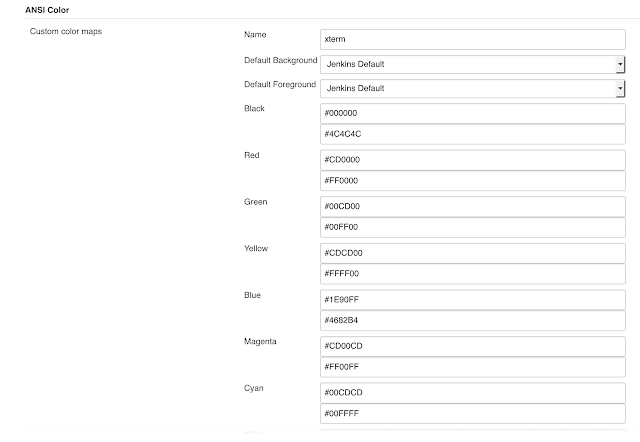
Jenkins is the main CI tool used in Software industry. This is the backbone tool for all CI and CD implementation, Build - release and deployment methods. With the help of 100s of plugin available around the jenkins, We can achieve so much of automation around build process including build/deployment pipeline, notification, analysis, pre and post build action etc. Jenkins has tremendous power to perform great amount of work around the core build process. Many time we write script in pre and post build action to perform many tasks which is becoming very command and necessary for automation. But the main limitation in running shell script is that it's very difficult to make it more human readable for errors and make it fancy. Today i am going to cover some steps to make the output of shell script colour formatted. Jenkins Configuration Steps First install following jenkins plugin https://wiki.jenkins-ci.org/display/JENKINS/AnsiColor+Plugin Go to jenkins configurati...
Lessons Learned in Jenkins Configuration Management

Summary: Managing the configuration of Jenkins—the popular open source, continuous integration and continuous delivery application—is not trivial. Even a small change can make the platform less stable or result in problems. Vishal Sahasrabuddhe talks about his experiences using Jenkins and offers tips to take advantage of its many powerful features to automate deployment and increase productivity and product quality. (Originally published on  cmcrossroads.com ) Configuration management requires that you automate application build, package, and deployment. There are many tools used to accomplish these tasks, but Jenkins is one of the most popular open source frameworks employed by teams today. Jenkins is widely used by developers to automate not only application procedures, but also continuous integration and continuous delivery. It comes with many powerful built-in features, and there are also hundreds of plugins that help it integrate with other tools and p...

Setup Docker slaves for Jenkins

Image
Jenkins is the one of the primary CI tool used in industry. Jenkins provide on cross planform support and have master-slave configuration. Your slave could be any operating system. Recently docker is becoming very popular for replacement of virtualisation up to some extend. Today I will detail out the steps needed to make  dynamically slave provision via docker images . Setting up Host for Docker You need to have your base machine either VM or hypervisor etc and need to install with all prerequisite. Lets install docker now. curl -sSL https://get.docker.com/ | sh

The Rise of the Jenkins CI Butler - by Jonathan McAllister

Author of Mastering Jenkins [Packt Publishing] [ http://www.masteringjenkins.com ] Kohsuke Kowaguchi designed and developed the Hudson automation system from the ground up while he was working at Oracle in 2006.  Primitive inceptions of the Jenkins platform (then known as Hudson) simply aimed to support continuous integration practices and offer a viable replacement for CruiseControl, which was the popular CI solution at the time. The Hudson platform was initially very Java centric with tight coupling to Maven and Java development paradigms. Little did Kohsuke know that his internal Hudson tool would catapult in notoriety, change names (into Jenkins), spin off to become CloudBees and eventually become the most popular modern Continuous Integration and automation orchestration platform in use in modern history. The current Jenkins platform provides an easily consumable unified user interface coupled with a highly scalable distributed automation solution that can build, t...

Setup Build - SCM System from beginning

This topic is specially for users who are new to the Build, SCM and Release Management and need to understand how can they setup the infrastructure and what are their options. To Build the system to automate the build and deployment process there are few main areas which needs to be covered. Following are our prerequisite. - Source code   - Builds System -  Deployments - QA Automation To describe above here are main ingredients

Jenkins Error - "Error while accessing rate limit API" for github pull request builder

If Jenkins throws following error for github pull request builder or for any https call Received fatal alert: handshake_failure (Like following) org.jenkinsci.plugins.ghprb.GhprbGitHub connect Can't connect to https://<github-enterprise-server>.com/api/v3 using oauth  org.jenkinsci.plugins.ghprb.GhprbRepository initGhRepository SEVERE: Error while accessing rate limit API javax.net.ssl.SSLHandshakeException: Received fatal alert: handshake_failure

Jenkins Plugin Tips and Tricks - Part 1

Image
In this section I will talk about Tips, Tricks, Troubleshooting of jenkins plugins. Role strategy Plugin This plugin adds a new role-based strategy to ease and fasten users management. You can even define pattern for the job and assign access for those jobs to users. Tip - > While specifying the pattern add the "." before "*", Otherwise pattern will not work. Ex-               test* will not match the job name which starts with test , You will need to add "." like test.* to match the job name starts with test.

Jenkins slave is not showing any log

Some time Jenkins Slaves are neither showing any log nor getting connected and you may feel that its stuck somewhere. Problem – The main problem could be the last connection was not cleaned up properly and its hung that is why nothing is shown in UI log. Solution – Try to disconnect and kill the process in slave if any and then try to reconnect again . Another option is that try to reconfigure slave with wrong config (say wrong port) are relaunch again, It will fail and cleanup connection, again configure back and relaunch, this should work.

14 must have Jenkins plugins to increase productivity

Image
Jenkins is vastly used continuous integration tool in current IT industry which is build and used around plugins. It has a core Jenkins tool and there are 100s of plug and play plugins available to enhance its power and usability. Here let’s take a look few best jenkins plugins to increase the productivity. Global Build Stats Plugin – It’s essential to know your current capacity, usage and capability before you go for capacity planning or system requirement because very first question is “what is your current capacity?”